Build an inventory manifest from pallet images and PDFs.
Upload supported images or PDFs, let Liquidata extract and combine candidate products, then review names, brands, models, quantities, conditions, confidence, and source references before finalization.
- Input
- JPG, PNG, WebP, or PDF — up to 20 files, 20 MB each
- Output
- An editable and finalizable line-item manifest
- Built for
- Liquidation buyers, bin stores, receiving teams, brokers
UNMANIFESTED LOAD INTAKE
Manifest Generation
Watch pallet photos become a source-linked manifest.
Illustrative workflow · no customer data
Source images pass under an extraction scan, candidate rows assemble, and a human review gate blocks finalization until edits are complete.
Source evidence · Image 01 · 3 crops
Mixed retail pallet
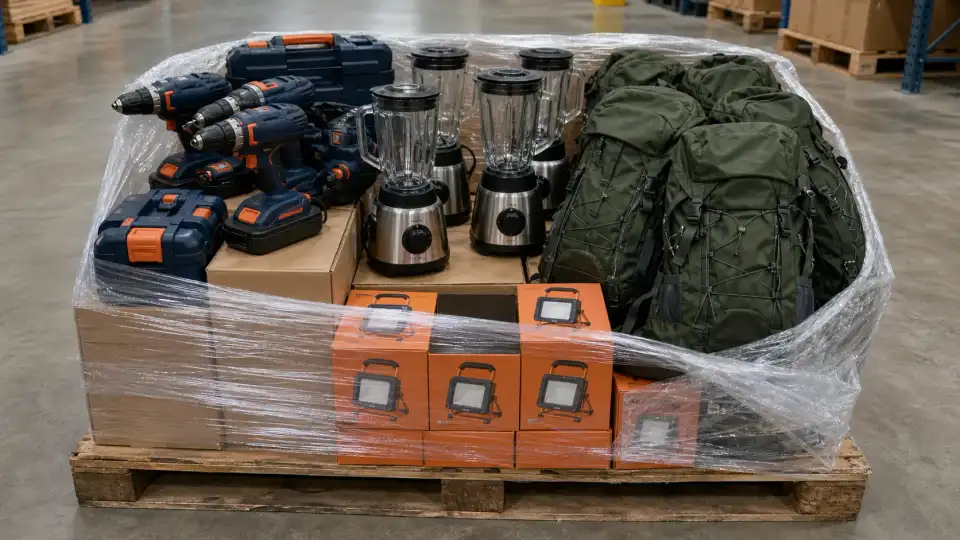 IMAGE 01 · WIDE Drill kitsCandidate BlendersCandidate DaypacksCandidate Work lightsReview required
 Candidate extraction · Editable draft
Generated manifest
- 01 Cordless drill kitBattery and caseImage 01 Confirmed Ready
- 02 Countertop blenderGlass pitcher · Stainless baseImage 01 Confirmed Ready
- 03 Technical hiking daypackForest green · NewImage 01 Confirmed Ready
- 04 Portable LED work lightOrange carton · NewImage 01
PendingConfirmed Review required Resolved
01 / THREE CROPS OF IMAGE 01
Load one mixed pallet image for review
A wide crop and two detail crops of Image 01 remain attached as source evidence. They are not treated as a finished inventory record.
02 / SOURCE-LINKED CANDIDATE ROWS
Turn visible products into specific manifest rows
Liquidata proposes product identity, condition, quantity, confidence, and an Image 01 source reference for each candidate row.
03 / HUMAN QUANTITY CHECK
Confirm an uncertain quantity and finalize
A detail crop shows why quantity review is required. The operator checks the source, changes the quantity state from pending to confirmed, and makes the draft ready to finalize.
Read the complete static workflow
- Upload: Load one mixed pallet image for review A wide crop and two detail crops of Image 01 remain attached as source evidence. They are not treated as a finished inventory record.
- Extract: Turn visible products into specific manifest rows Liquidata proposes product identity, condition, quantity, confidence, and an Image 01 source reference for each candidate row.
- Review: Confirm an uncertain quantity and finalize A detail crop shows why quantity review is required. The operator checks the source, changes the quantity state from pending to confirmed, and makes the draft ready to finalize.
Input: JPG, PNG, WebP, or PDF — up to 20 files, 20 MB each
Output: An editable and finalizable line-item manifest
REAL-WORLD USE CASES
Where Manifest Generation fits into the work.
Start with the operating situation, then use the product record to move the work forward.- Receiving teams
Create a draft from pallet photographs
Upload JPG, PNG, or WebP evidence for an unmanifested load. Let extraction assemble candidate products with source references and confidence.
- Brokers and inventory teams
Convert a source PDF into editable rows
Upload a supported PDF, then review product names, brands, models, quantities, conditions, and row structure before the record becomes final.
- Operations teams
Prepare inventory for the next workflow
Correct uncertain or obscured items, save the current revision, and finalize the manifest before analysis, export, or label generation.
SUPPORTED INPUT
Images and PDFs enter one review studio.
- Formats
- JPG · PNG · WebP · PDF
- File count
- Up to 20
- Per file
- 20 MB maximum
- Usage estimate
- About 15–25 credits / image
HUMAN REVIEW GATE
Extraction creates the draft. Review creates the manifest.
Obscured and stacked inventory can make quantities uncertain. Finalization remains a deliberate action.- 01CAPTURE
Upload the load evidence
Add up to 20 JPG, PNG, WebP, or PDF files, each no larger than 20 MB.
- 02EXTRACT
Extract candidate lines
Liquidata processes the files asynchronously, combines candidates, and records source references and confidence.
- 03REVIEW
Review and correct
Edit product name, brand, model, quantity, and condition. Add or remove rows when the images do not tell the full story.
- 04SAVE
Save a revision
Keep the reviewed draft current before finalization. Conflicting revisions must be reloaded rather than overwritten.
- 05FINALIZE
Finalize and hand off
Finalize the manifest, export it, or continue into liquidation analysis and label generation.
AFTER FINALIZATION
One reviewed record. Three useful directions.
Editable extraction
Correct identity, quantity, condition, and row structure before the manifest becomes final.
Confidence in view
Uncertain extraction stays visible so stacked, obscured, or incomplete units receive human attention.
Downstream handoff
A finalized manifest can move to value analysis, export, and physical-label workflows.
OPERATING BOUNDARY
What Manifest Generation does not claim.
Useful output stays useful only when its eligibility, confidence, user inputs, and visibility limits stay attached.- 01
This surface accepts supported images and PDFs. Spreadsheet seller manifests belong in New Analysis.
- 02
Obscured or stacked units can produce estimated counts. Confidence communicates uncertainty; user review is required.
- 03
Finalization is required before downstream analysis and label actions.
- 04
Generation uses credits based on document size and extraction complexity. The pre-upload interface estimates about 15–25 credits per image; actual work can fail or require a retry.
CHECK THE PUBLIC RECORD
Inspect the method before the next action.
QUESTIONS TO SETTLE
Before you use Manifest Generation.
Where do Amazon Liquidation Auctions, B-Stock, and Direct Liquidation spreadsheets go?
Use Manifest Analysis for Excel or CSV seller manifests from those marketplaces. Manifest Generation accepts JPG, PNG, WebP, and PDF source evidence.
Is the generated manifest final immediately?
No. It enters an editable review stage. You correct the rows and finalize the record before downstream use.
How much does a run use?
Usage is credit-based and varies with document size and extraction complexity. The interface shows a pre-upload estimate of about 15–25 credits per image.
NEXT ACTION
Build a manifest from images.
Use Liquidata’s inventory manifest generator to turn pallet images or PDFs into editable rows with confidence, review, finalization, and CSV export.